Pantry shelves
Dry goods, sauces, snacks, canned food, and backup supplies often sit long enough for dates and quantities to matter.
Pantry inventory app guide
ItemLog helps you keep a practical home inventory without maintaining a spreadsheet. Capture pantry, fridge, and freezer items, review editable details, save quantities and storage locations, and use reminders before expiry dates are forgotten.
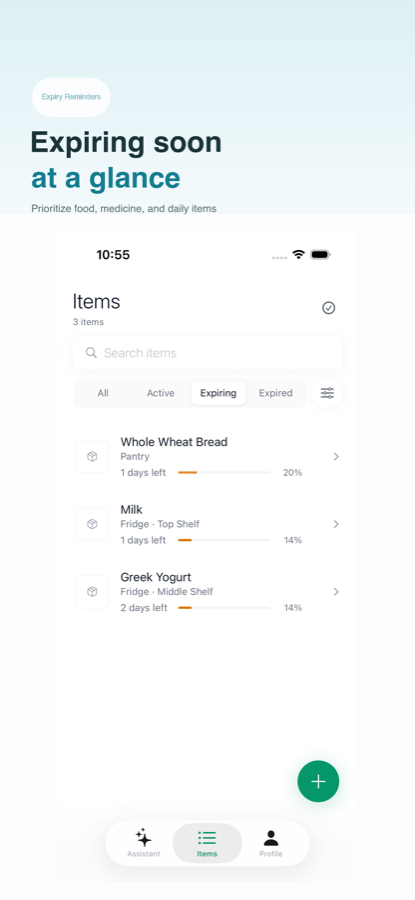
A useful pantry inventory record is more than a product name. It needs enough structure to answer daily questions: what is in the pantry, what is in the fridge, what expires soon, what has no date, and what is already stocked.
Dry goods, sauces, snacks, canned food, and backup supplies often sit long enough for dates and quantities to matter.
Cold storage changes quickly, so location, quantity, and reminder timing need to stay easy to update.
Expiry dates and notes can be recorded, while safety choices should still follow labels and professional guidance.
The best inventory system is the one you can keep using. ItemLog keeps the loop short and mobile-friendly, so one grocery trip does not turn into spreadsheet maintenance.
Add items from a package photo, receipt, text note, or voice input.
Check names, quantities, locations, prices, dates, reminders, and notes before saving.
Keep the record in a structured list that can be searched, filtered, and updated later.
Use local notifications and expiry views to notice items before they are forgotten.
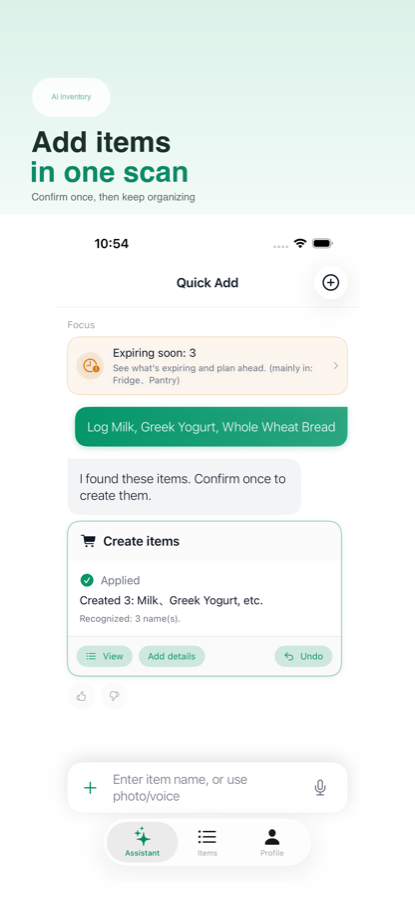
A spreadsheet can be powerful, but many household lists fail because updating them takes too long on a phone. Notes are quick, but expiry dates and locations become hard to review. ItemLog focuses on the repeated task of keeping inventory records fresh.
| Need | Notes | Spreadsheet | ItemLog |
|---|---|---|---|
| Quick package capture | Text only unless manually organized | Usually manual typing | Photo-assisted, text, or voice |
| Expiry date tracking | Easy to miss | Possible with upkeep | Built into item records |
| Fridge and freezer filters | Manual sections | Custom columns | Structured locations |
| Mobile maintenance | Fast but loose | Flexible but heavy | Focused inventory flow |
| Records and privacy | Depends on app settings | Depends on file storage | Device records with optional network features |
Photo-assisted entry is useful when packaging has many small fields, but recognition can be wrong. ItemLog treats AI output as editable data entry. Review names, expiry dates, quantities, and reminders before saving or relying on the result.
Change the fields before saving so the record matches the package and your actual storage situation.
Routine analytics are designed around counts, buckets, timing, and error categories rather than item names or image content.
Food safety, allergens, medicine, baby products, and health-related decisions should follow labels and professional guidance.
The most useful inventory habit is simple enough to repeat. ItemLog is designed around a few recurring household checks rather than a large database project.
When groceries, medicine, or home supplies arrive, capture the package while it is already in your hand. Save location, quantity, and any date that is clear enough to trust.
Before a shopping trip, search the list for items that are already stocked. This is especially useful for freezer items, backup pantry goods, supplements, and cleaning supplies.
Use expiry views as a prompt to inspect items physically, update quantities, remove consumed records, and decide what needs attention next.
ItemLog is a good fit if you want a lightweight pantry inventory app for personal records, shared home routines, or regular shelf reviews. It is especially helpful when items live in several places: a pantry shelf, a fridge drawer, a freezer bin, a medicine box, and a storage cabinet.
Keep enough structure to find what you have without turning the app into a chore after every purchase.
Track expiry dates, production dates, missing dates, and local reminders in one record format.
Use photo-assisted entry for speed, then manually review and edit records before saving them.
A pantry inventory app should track item names, quantities, storage locations, expiry dates, production dates, notes, and reminder timing so you can review what needs attention before a shopping trip or shelf reset.
Yes. ItemLog can save expiry dates, production dates, quantities, storage locations, and reminders for food records. It helps organize dates, but it does not decide whether food is safe to eat.
Yes. ItemLog can be used for pantry shelves, fridge lists, freezer items, medicine cabinet records, and other household supplies.
Photo-assisted entry can reduce typing by turning package or receipt details into editable records. You should still review the result before saving or relying on it.
ItemLog is designed for repeated mobile inventory tasks such as capture, review, save, and remind. A spreadsheet can still work for custom analysis, but it usually needs more manual upkeep.
No. ItemLog is a personal record and reminder utility. It does not judge whether an item is safe to eat or use.
No. Core item recording, browsing, editing, and local reminders work without account registration.